How to Run a Patreon Poll With Images
You have two cover options, four character designs, or a handful of sketches — and you want your patrons to pick one. Then you open Patreon’s poll composer and hit the wall every creator hits: Patreon polls are text-only. You can write up to 20 options, but you can’t attach a picture to any of them (Patreon’s own guide confirms it).
For an artist, that’s not a small gap — most decisions worth polling are pictures. Here are the three ways creators actually run a Patreon poll with images, from free-and-clunky to purpose-built.
Option 1: Images in the post, text poll below it
The all-native workaround. You publish a patron-only post, drop the images into the post body, number them, and add a poll block with matching text options — “Option 1”, “Option 2”, and so on.
- Upload your images into the post and caption them 1, 2, 3… right in the image or the caption.
- Add a poll block below with one text option per image, using the same numbers.
- Set an end date and limit responses to one per member.
Why it works: it’s free, it lives in your Patreon feed, and only members who can see the post can vote.
Where it breaks: the options are detached from the pictures. On a phone, a patron scrolls past image 4, forgets what image 1 looked like, scrolls back up, loses the poll. Votes drift toward whichever image happens to sit closest to the poll block. And every vote counts the same — a two-year, top-tier supporter and a $3 member who joined yesterday get exactly one voice each, with no voting power to tell them apart.
Option 2: A generic image poll maker
Tools like StrawPoll or Polltab let you build a real picture poll — image options, click to vote — and you link it from a patron-only post.
Why it works: the voting experience is right: patrons tap the picture itself, results show under each image.
Where it breaks: the link is the only lock. Anyone who gets it can vote — it leaks into a Discord screenshot or a repost and your “patron poll” is now a public one. There’s no membership check, duplicate protection is a cookie or an IP address, and if a result looks brigaded you have no way to prove it wasn’t. You also can’t see votes by tier, let alone weight them.
Option 3: An image poll tool built for Patreon
PatronVoice exists for exactly this case. Polls are image-first — you pick a layout for how the pictures face off:
- Duel — two images head-to-head, for cover A vs. cover B decisions;
- Grid — up to a wall of thumbnails, for “which character next?” votes;
- List — stacked options with live result bars.
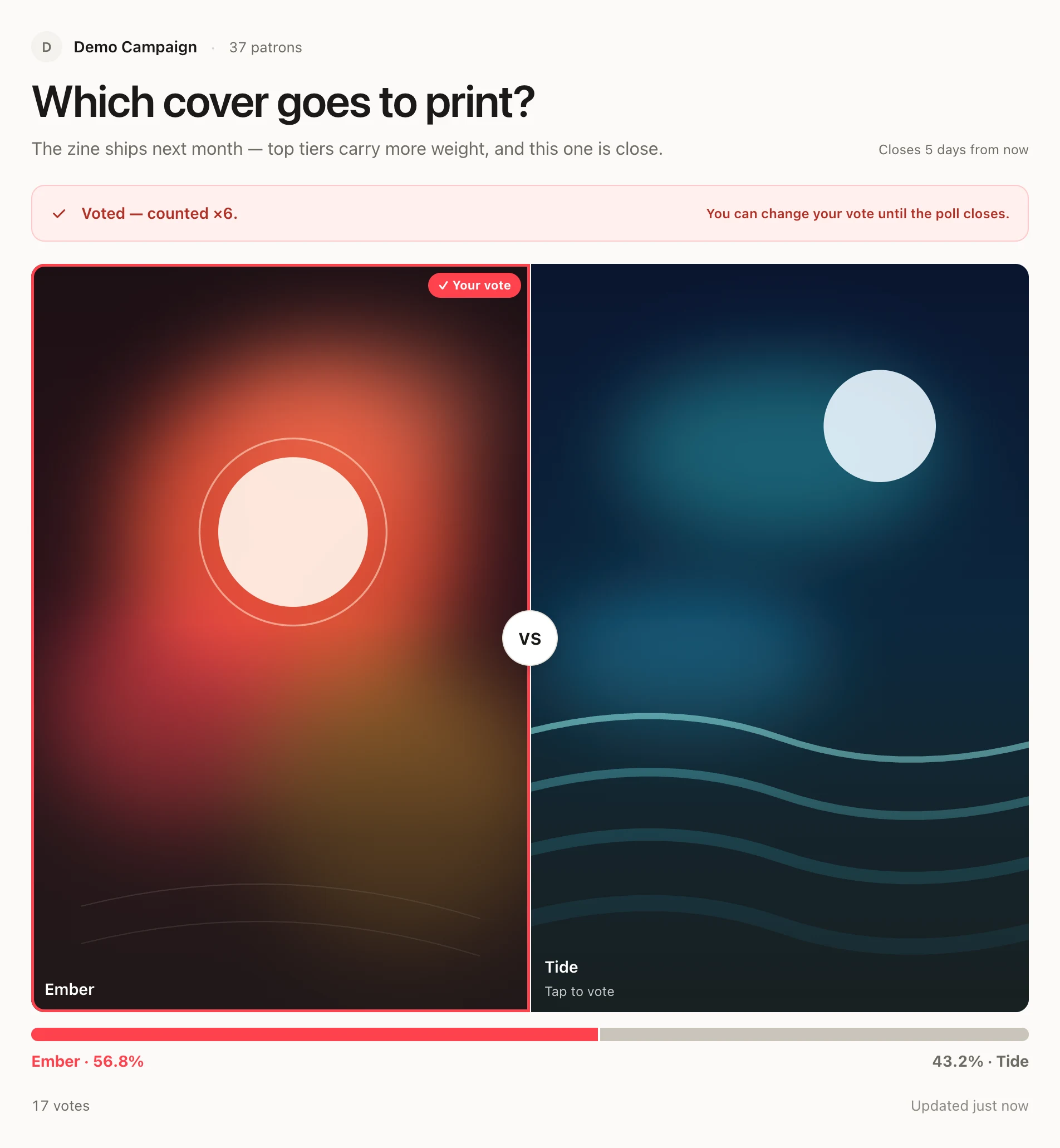
The difference from a generic poll maker is what happens when a patron opens the link: they sign in with the Patreon account they already have, PatronVoice verifies their membership through the official Patreon API, and only then does the vote count. No new password, no leaked-link problem, no ballot stuffing — and each tier votes with the weight you assigned it, so results reflect your actual community, not whoever clicked fastest.
The three routes, side by side
| Images in post + text poll | Generic poll maker | PatronVoice | |
|---|---|---|---|
| Pictures as poll options | No — numbered workaround | Yes | Yes — duel, grid, list |
| Patron-only voting | Yes | No — anyone with the link | Yes — verified via Patreon |
| Voting power by tier | No | No | Yes — per-tier weights |
| Duplicate protection | One vote per member | Cookie / IP only | One verified account = one vote |
| Price | Free | Free tiers exist | From $3/month |
Five tips for image polls that get votes
- Crop everything to the same aspect ratio. A wide sketch next to a tall portrait reads as “finished vs. unfinished” and skews the vote.
- Keep labels short. The picture is the option; the label is just a handle (“Ember”, “Night city”), not a paragraph.
- Set a deadline and say it. “Voting closes Friday” converts lurkers into voters better than an open-ended poll.
- Post the link patron-only. Even with verified voting, announcing the poll inside a members-only post keeps the benefit feeling exclusive.
- Show the result and ship it. The vote only builds loyalty if patrons see the winning picture become the real thing — announce the winner and credit the poll when you post the finished piece.
If your polls are mostly pictures and your patrons are paying different amounts for different tiers, a purpose-built tool stops being a luxury pretty quickly. For everything on weighting those votes fairly, see the guide on running weighted polls for your Patreon tiers, or compare all the options in Patreon Polls vs Discord vs Google Forms vs StrawPoll.
Frequently asked questions
Can Patreon polls include images?
No. Patreon’s built-in poll block supports up to 20 text-only options — you can’t attach an image to an option. Creators work around it by putting numbered images in the post body with a text poll below, or by linking out to an external image poll.
How do I make sure only my patrons vote in an image poll?
Generic poll makers can’t check who is voting: anyone who gets the link can vote, and there is no reliable way to stop duplicates. A tool built for Patreon, like PatronVoice, signs each voter in with their Patreon account and verifies an active membership before counting the vote.
Can higher tiers get more voting power in an image poll?
Not with native Patreon polls or generic poll makers — every vote counts the same. PatronVoice lets you assign a vote weight to each Patreon tier (for example ×1 for Bronze, ×5 for Gold), and the weighted results update live.
Do patrons need to create a new account to vote?
With PatronVoice, no. Patrons open the poll link and sign in with the Patreon account they already have, in one tap. The tool reads their membership tier only — never payment details.
Run your first weighted image poll
Connect your Patreon campaign, set a vote weight per tier, and share one link. Patrons vote in one tap with their existing Patreon account — no new passwords.
Keep reading
-
How to Run Weighted Polls for Your Patreon Tiers
A $50 patron shouldn’t be outvoted by a drive-by free member. How to pick fair tier weights, count a weighted poll by hand in a spreadsheet, and when to automate it.
-
12 Patreon Poll Ideas That Give Patrons a Real Say
Patrons rarely cancel because the work got worse — they cancel when the pledge stops feeling like it does anything. Twelve poll ideas that make membership feel like a seat at the table.
-
Patreon Polls vs Discord vs Google Forms vs StrawPoll vs PatronVoice
Five ways to poll your patrons, compared honestly: what each tool verifies, what it can show, what it costs you in busywork — and a decision guide at the end.
PatronVoice is an independent product and is not affiliated with, endorsed by, or sponsored by Patreon, Inc. Patreon is a trademark of Patreon, Inc.